Description
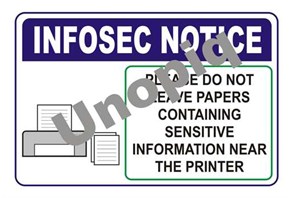
The above image is only a preview. This sticker signage supports everyday information security. It reminds users to keep sensitive printouts protected. Therefore, it helps reduce paper-based data leaks. It also supports clean-desk practices.
What is this Product?
This is an information security reminder sticker signage. It is designed for printer areas. It clearly says, “Please do not leave papers containing sensitive information near the printer.” So, users take action immediately. Also, the message is easy to understand. Moreover, it creates a consistent habit across teams.
It suits any place with shared printing. It also suits controlled offices. Additionally, it supports audit readiness for ISO 27001. It also supports internal policies and SOPs.
Specifications:
- Size: 13″ x 19″
- Soft laminated
- Sticker
Who can use?
IT teams can use it near printers and copiers. Also, InfoSec teams can use it for awareness. Moreover, Admin teams can use it for discipline. HR teams can use it for employee guidance. Facility managers can also use it. Therefore, it fits both small and large workplaces.
Use cases include these workplaces:
Corporate offices and shared workspaces
Factories with admin blocks
Warehouses with dispatch documentation
Hospitals with records printing
Schools and training centers with shared printing
Service centers with customer paperwork
Why is it useful?
Printer areas are high-risk points for paper exposure. People print and walk away quickly. Therefore, documents remain visible to others. This sticker reduces that risk. It creates a quick pause for users. So, they collect printouts immediately.
It also reduces misplacement and mix-ups. Therefore, confidential pages do not get swapped. It also reduces accidental disposal. Moreover, it supports privacy culture. As a result, your workplace looks more disciplined.
Practical benefits you will notice:
Faster collection of printouts
Fewer sensitive pages left unattended
Better compliance during audits
Reduced chances of data leakage
Clear reminders without repeated verbal follow-ups
Specifications and application guidance
This is a self-adhesive sticker signage for smooth surfaces. It performs best on clean, dry, flat areas. For example, use glass and metal panels. Also use laminate and acrylic surfaces. Moreover, use smooth painted boards near printers.
For best results, follow these steps:
First, clean the surface to remove dust.
Next, remove oil marks using a mild cleaner.
Then, dry the surface completely.
After that, align the sticker straight.
Finally, press firmly from center outward.
Also, place it at eye level near the printer. Moreover, place it where users face while collecting prints. Therefore, it becomes hard to miss. In addition, avoid rough and damp walls. So, the sticker stays neat longer.
Suggested supporting practices for teams:
Collect printouts immediately after printing.
Use trays clearly marked for departments.
Shred unwanted pages using approved bins.
Avoid printing confidential pages unnecessarily.
Follow your clean-desk and clear-screen rules.
Safety and legal note: This signage supports awareness only. It does not replace security procedures. It also does not replace document control systems. Always follow your organization’s information security policy. Unopiq Products is not responsible for data loss, privacy breaches, penalties, or damages arising from misuse, incorrect placement, poor surface preparation, or failure to follow internal procedures.